Find College Coaches: How to Build a List That Actually Works
If you're trying to find college coaches — not just scroll Instagram highlights, but get real names, roles, and email addresses — you're doing two jobs at once: research (who coaches where?) and outreach (who should receive your first message?). This guide focuses on the research half: where coach information lives, how to read a staff directory, and how to turn hundreds of athletic department websites into an organised target list.
What people usually mean by "find college coaches"
In practice, that search breaks down into a few concrete needs:
- Contact discovery: institutional email addresses and phone numbers for head coaches, assistants, recruiting coordinators, or sport-specific directors.
- Role clarity: knowing whether you should email the recruiting coordinator, your position coach, or the head coach first.
- Scale: doing the above for dozens of programmes without spending every weekend opening the same three broken staff-directory links.
None of that requires a secret database. Almost everything starts on the school's official athletics website. The hard part is doing it consistently across 200+ schools while keeping your list up to date when staffs turn over.
Step 1: Start on the official athletics site (not social first)
For any NCAA member school, the authoritative source is almost always:
[school athletics domain] → Sports menu → your sport → Staff or Coaches
Below is a real-world pattern using Harvard Athletics (gocrimson.com): first open Teams and pick your sport from the mega-menu (Football is outlined in red). After the sport hub loads, use the sport sub-navigation and open Coaches (also outlined). Labels vary by school—look for Coaches, Staff, or sometimes Roster first.
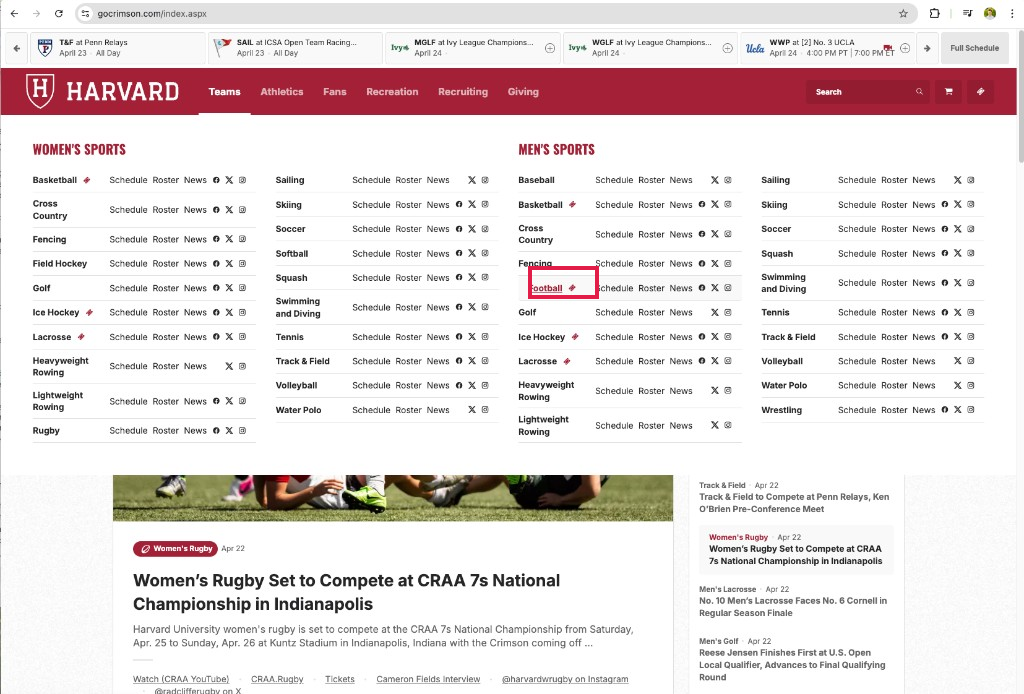
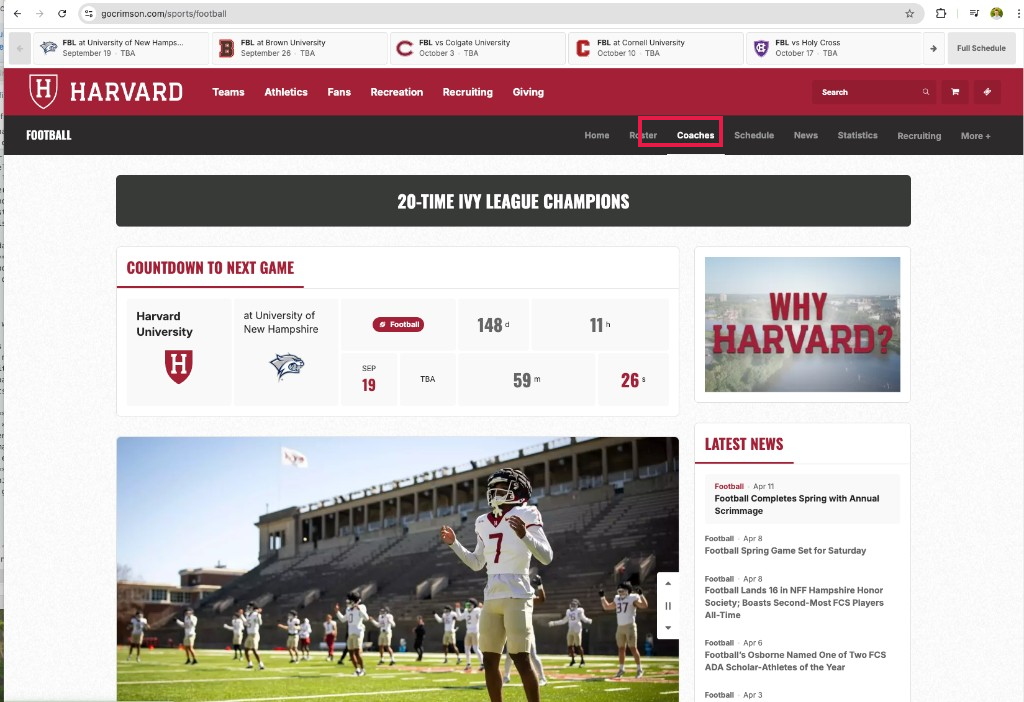
Harvard screenshots illustrate layout only; your target school may use different vendors, colours, or wording.
Staff pages are usually linked from the sport's landing page. If the sport page is thin, try the global Staff Directory or Athletics Directory in the site footer — larger departments centralise listings there.
What to capture on first pass
- Coach or staff member name and title (exact wording matters — "Recruiting Coordinator" vs "Director of Operations" tells you who owns inboxes).
- Email when listed (often a
firstname.lastname@orinitials@pattern you can confirm). - Phone if shown — some families prefer a call after an email thread starts; others never call. Either way, record it if it's public.
If a page is outdated (bio from three seasons ago), cross-check the current season's roster or news releases — schools often announce hires in short news posts before the directory catches up.
Step 2: Learn who actually reads recruiting mail
Finding a coach's email is useless if you email the wrong person first. At many Division I programmes, assistant coaches or recruiting coordinators triage first contact while the head coach focuses on current players and committed recruits.
Rule of thumb: if the staff page lists a recruiting coordinator or recruiting director for your sport, that role is often the right first inbox for initial film and academic summaries — unless the programme explicitly directs recruits elsewhere. When in doubt, your position coach (same event, same position group) is a strong second choice. Always read the one-line bio: some assistants own a geographic region or international pipeline.
Step 3: Build a tiered list (quality over spray-and-pray)
Before you open fifty tabs, decide how you'll score schools so you're not treating every programme identically.
Tier 1 — Realistic athletic and academic fit. You could contribute on the field or in the pool this intake cycle, and you'd plausibly be admitted (or cleared for Ivy-style support if that's your lane).
Tier 2 — Reach schools. You'd need a breakout season or test score bump, but the staff recruits athletes roughly in your band.
Tier 3 — Dream / lottery tickets. Fine to include a few — they shouldn't be the whole spreadsheet.
Aim for roughly 30–50 active conversations across tiers, not 300 identical emails. Volume without fit wastes everyone's time — including yours.
Step 4: When to use staff directories vs a compiled list
Staff directories are free and correct in principle — but they're maintained by dozens of different vendors (SIDEARM, PrestoSports, etc.), buried behind inconsistent navigation, and they change mid-season when assistants take other jobs.
A compiled, sport-wide list (one row per coach per school, conference labelled, exportable to Excel or Sheets) exists to remove duplicate work: you still write your own emails and choose your own targets, but you stop manually re-keying the same directory fields for every school in your sport.
On this site, Division I lists are organised by sport — for example:
- Women's basketball coach contacts
- Men's soccer coach contacts
- Football coach contacts
- Women's swimming & diving coach contacts
- Men's track & field coach contacts
Pick your sport, confirm the division and update label on the page, then create a free account and export when you're ready to work in a spreadsheet.
Step 5: After you have names — move to outreach
Finding coaches is not the same as getting a reply. Once you have a clean list, read our full playbook on how to contact college coaches — timing, subject lines, what to put in the first 200 words, and how to interpret silence without spiralling.
Additional guides on templates, staff org charts, and follow-up cadence are rolling out on the guides hub; the contact guide above is the best next step today.
Pro tips (carry straight into your first email)
- Stay brief. One short paragraph plus a small summary table of headline academic and athletic stats beats a long story on first contact.
- Link the socials you actually maintain — Instagram, X, YouTube, Hudl, etc. — so staff can follow you back or re-watch film without hunting.
- Optional: some athletes use a simple Gmail-style plug-in for rough open/reply signals (read-receipt style tools — names like Mailtrack or Mailcheck-style add-ons get mentioned often; verify privacy terms). Treat it as imperfect data, not proof a coach read every word.
- Send around 9–10 a.m. in the coach's local timezone, mid-week when possible — fewer buried sends than late-night blasts.
The how to contact college coaches guide expands each of these with examples and guardrails.
Division I vs the rest of the NCAA
This site's free lists cover NCAA Division I, II, and III. The same directory habits apply at every level — but scholarship rules, recruiting calendars, and staff sizes differ, so always confirm division-specific recruiting rules on the current NCAA or conference site before you assume one timeline fits every level.
Ethics and etiquette (short but non-negotiable)
- Use publicly listed institutional contact paths for first outreach — not scraped personal data from unrelated sources.
- Subject lines should be honest (name, grad year, position/event, geography). Do not clickbait a coach.
- Unsubscribe / stop if a programme asks you to — rare, but respect it.
Checklist before you send your first wave
- [ ] I can name why each school is on my list (beyond "D1").
- [ ] I know which role I am emailing first at each programme.
- [ ] My film link works on mobile; my academic line is accurate.
- [ ] I have a follow-up date on the calendar (4–6 weeks with real updates, not "just checking in").
When those boxes are ticked, you're not just searching "find college coaches" — you're running a small recruiting campaign. That's the bar coaches notice.